






Stop Exporting Financials to Excel. Start Clicking Into Them.

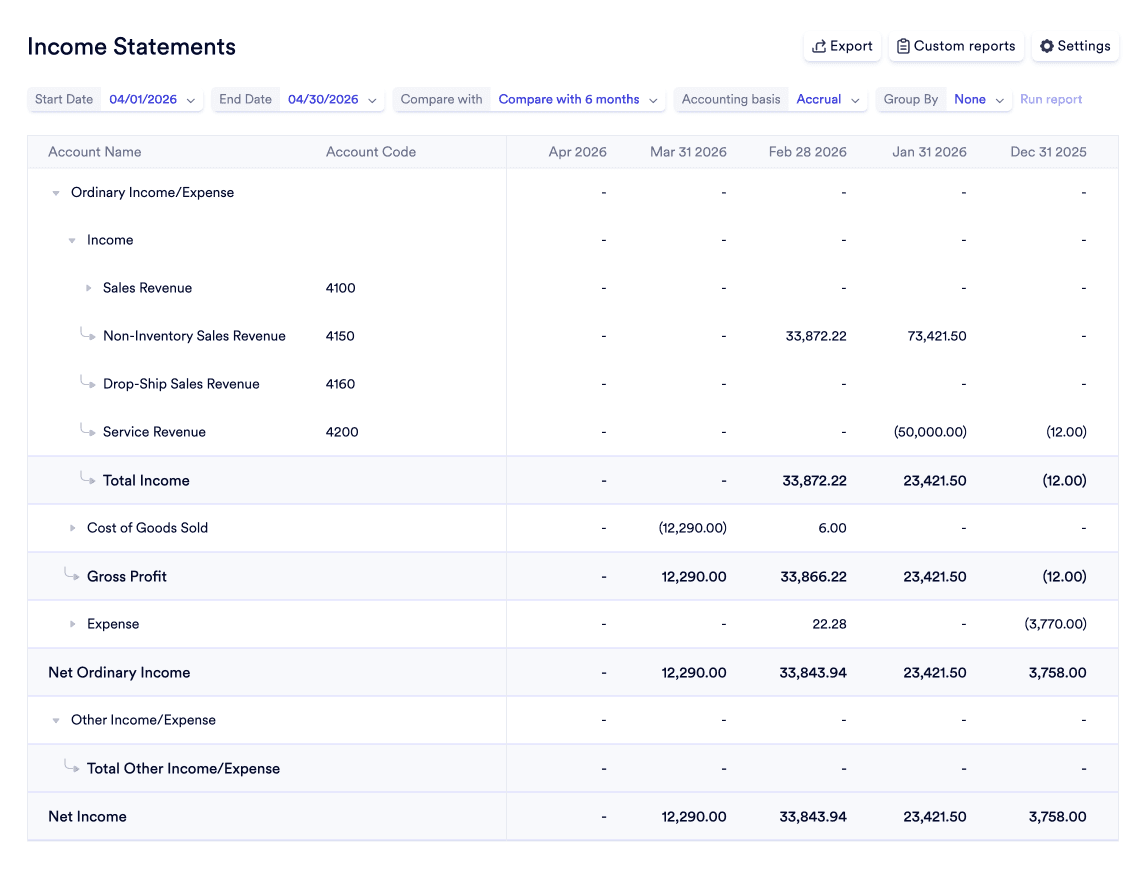
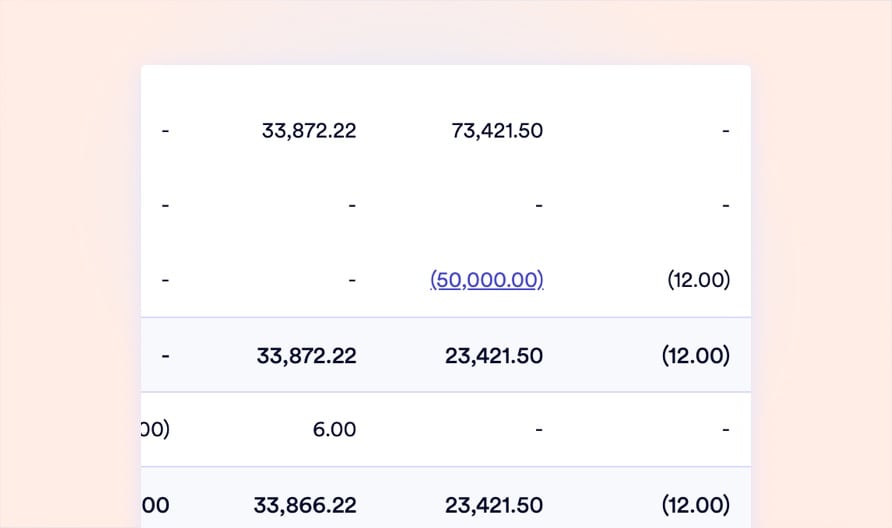
Your CFO questions a $47K expense spike on the Income Statement. In legacy systems, that triggers a 3-day scavenger hunt through exported CSVs. In Naologic, they click the number and see every underlying journal entry, source document, and vendor bill instantly. Interactive financial statements with live drill-downs, saved templates, and one-click generation - built for manufacturing leadership that demands answers in seconds, not days.

Add an image or video
Logo 1
Logo 2
Logo 3
Logo 4
The executive reporting gap

What Static Reporting Costs You Every Month

CFOs lose entire weeks to manual report configuration and exported spreadsheets. Every hour your Controller spends rebuilding the same Balance Sheet filters is an hour not spent analyzing margins, forecasting cash, or preparing for audits.
2-3 weeks
average time mid-market manufacturers spend closing the books each month with legacy tools
80%
of CFO report requests require analysts to export raw data to Excel before any analysis can begin
$0
the amount of actionable insight a static PDF report delivers when your CEO needs to drill into a specific line item
6+ hours
spent every month manually re-configuring identical date filters and column comparisons for recurring executive briefings
Financial Statements

Click Any Number. See Every Transaction Behind It.

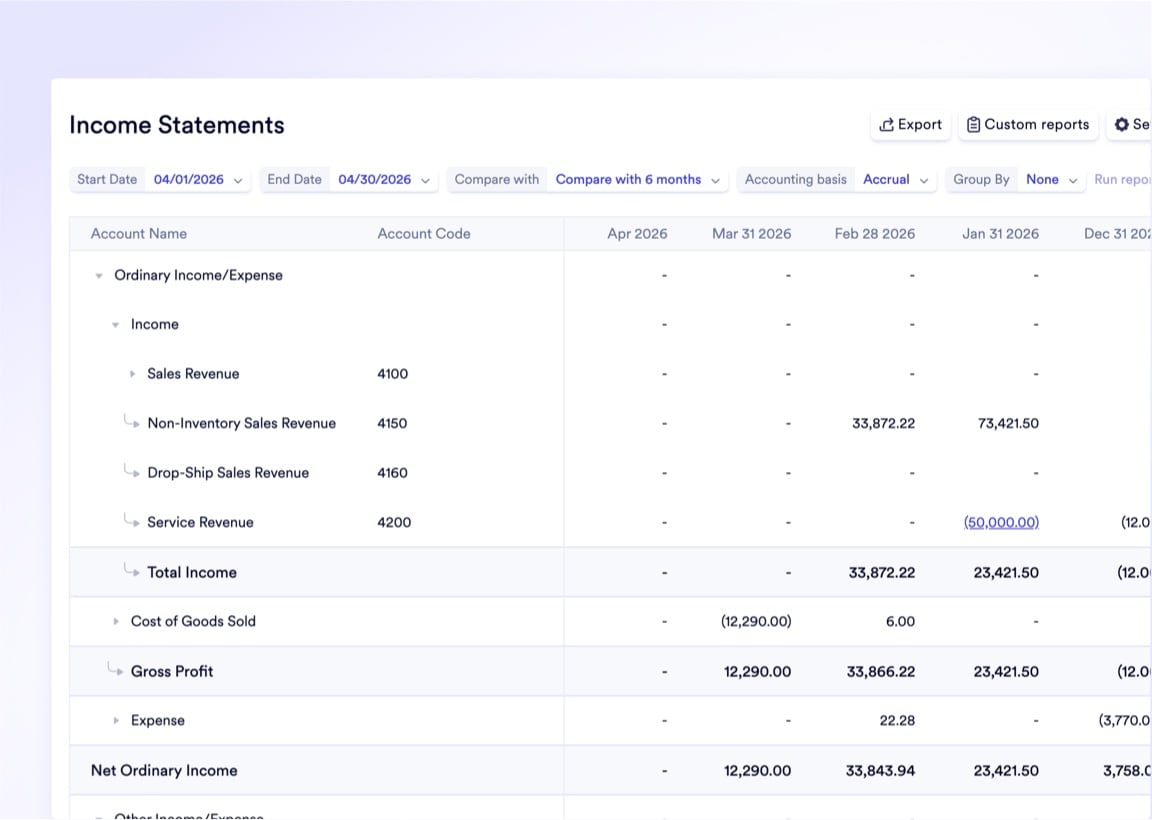
our Income Statement, Balance Sheet, and Cash Flow Statement are not static PDFs - they are live, interactive dashboards. Toggle between cash and accrual basis, compare any two periods side-by-side, and when the board questions a number, click it to instantly drill down into the exact journal entries and source documents underneath. Save your exact configuration as a reusable template and regenerate next month's executive briefing in one click.

Income Statement with period-over-period comparison
Balance Sheet with drill-down into asset and liability detail
Cash Flow Statement with Operating, Investing, and Financing splits
Trial Balance with full Chart of Accounts mapping
One-click saved templates for recurring reports
Toggle between cash and accrual accounting basis
Add images via component properties
Core financial capabilities

Every Tool Your Finance Team Needs in One System

Receivables and Collections

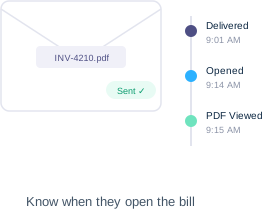
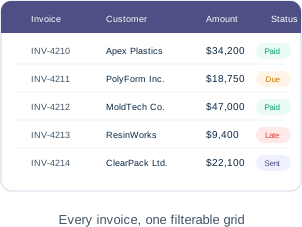
Track every customer invoice from issuance through payment. Email invoices directly from the system with real-time open-and-read telemetry so you know exactly when customers see their bill.

  • Customer invoice master grid with payment status filters
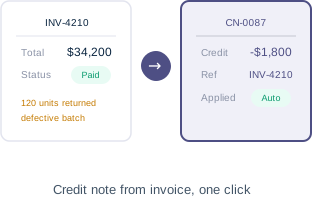
  • Issue credit notes directly from the original invoice
  • Email invoices with delivery and open tracking
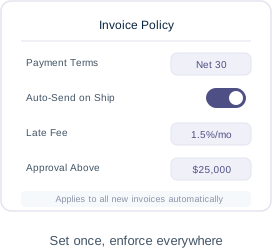
  • Configurable invoicing policies (ordered vs. delivered)

Payables and Vendor Bills

Centralize all vendor liabilities with native 3-way matching to POs and Goods Receipts. Color-coded alerts flag approaching due dates so you never miss an early-pay discount.

  • 3-way matching: bill to PO to receipt
  • Color-coded overdue and approaching-due alerts
  • Vendor credit memos applied automatically to future payments
  • ACH batch payments with per-bill banking details

General Ledger Mastery

Draft complex, multi-line journal entries with continuous debit-credit validation. Every automated entry links back to its source document for instant, clickable audit trails.

  • Multi-line journal entries with live balance validation
  • Source document tracing on every automated entry
  • Journal reversals and administrative voiding
  • Multi-dimensional tagging (warehouse, department, project)

Automated Recurring Entries

Build templates for monthly accruals, rent, and depreciation entries. The system drafts and posts them on schedule - your team reviews exceptions, not routine work.

  • Journal templates with configurable recurrence schedules
  • Auto-post or draft-for-approval execution policies
  • Scheduled entries dashboard with manual early-execution
  • Template-level posting permission controls
Accounts Receivable

From Invoice to Cash Collection in a Single Workflow

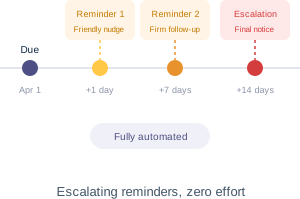
Stop downloading PDF invoices from your ERP just to email them through Outlook. Generate, customize, and dispatch invoices directly from Naologic with real-time email telemetry showing exactly when a customer opens the bill. The system automatically triggers follow-up reminders the second a payment becomes overdue, while credit notes and memos flow back against outstanding balances without manual intervention.

Book Your Demo
Invoice Master Grid
Email Telemetry
One-Click Credit Notes
Automated Reminders
Invoicing Policies
Bank Reconciliation

Turn a Multi-Week Close Into a Few Hours

Throw away the highlighters and printed bank statements. Naologic's Reconciliation command center brings your bank feed and open invoices onto a single screen. Match transactions manually or let the AI auto-suggest high-probability pairings in green. When a wire arrives $15 short due to a bank fee, post the adjustment directly inside the reconciliation screen without abandoning your workflow. Every matched transaction disappears from your active feed, creating a clean, diminishing to-do list that drives you toward zero.

AI-Powered Transaction Matching

Stop manually eyeballing bank lines against invoice amounts. Enable AI Auto-Suggest and the system evaluates your entire bank feed, highlighting high-probability document matches. Review the suggested pairings and click Accept All to process the bulk of your monthly reconciliation in minutes instead of days

Typical reconciliation time reduced from 2+ weeks to under 4 hours

Inline Adjustments and Direct Payments

When a transaction has no matching document, create a direct payment or prepayment without leaving the screen. Post bank fees, rounding variances, and minor discrepancies as inline adjustments. The system logs every correction to the audit trail while keeping your workflow uninterrupted.

Supports prepayments, bank fee adjustments, and rounding variance corrections

Fixed Assets

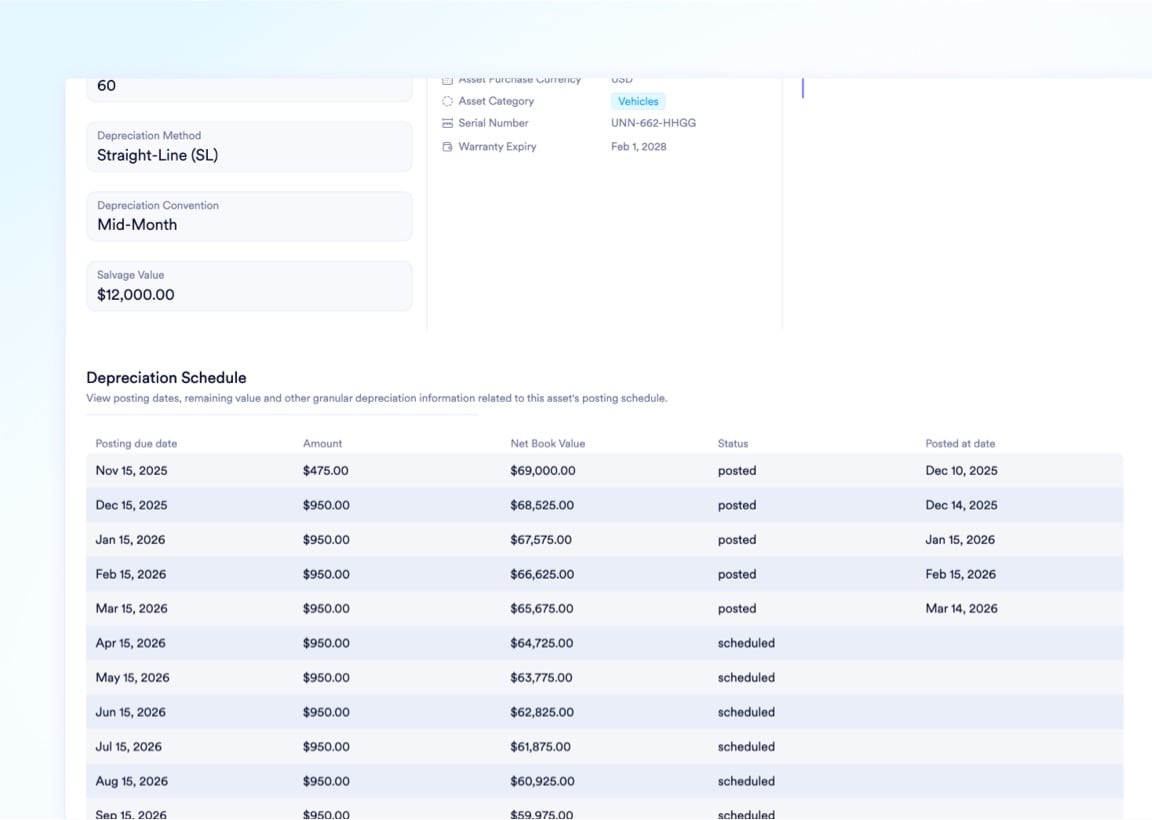
Depreciation on Autopilot

Stop calculating monthly depreciation manually.

100%

of monthly depreciation entries auto-generated and posted without manual intervention

Automated Depreciation Schedules

Define acquisition cost, salvage value, and useful life once. Naologic auto-generates a complete month-by-month schedule for the entire asset lifecycle, posting journal entries automatically on each period close

Real-Time Net Book Value

Multiple Depreciation Methods

Proactive CapEx Planning

Upload an image or video

Source Document Tracing for Frictionless Audits

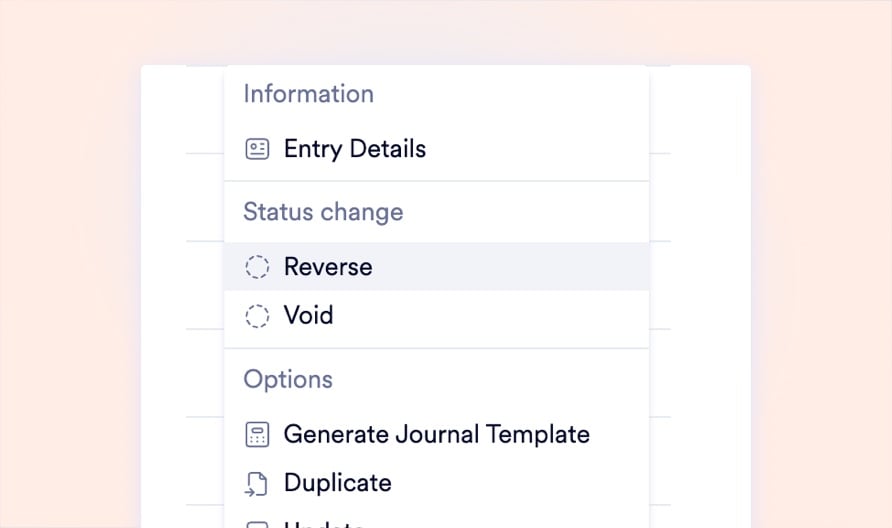
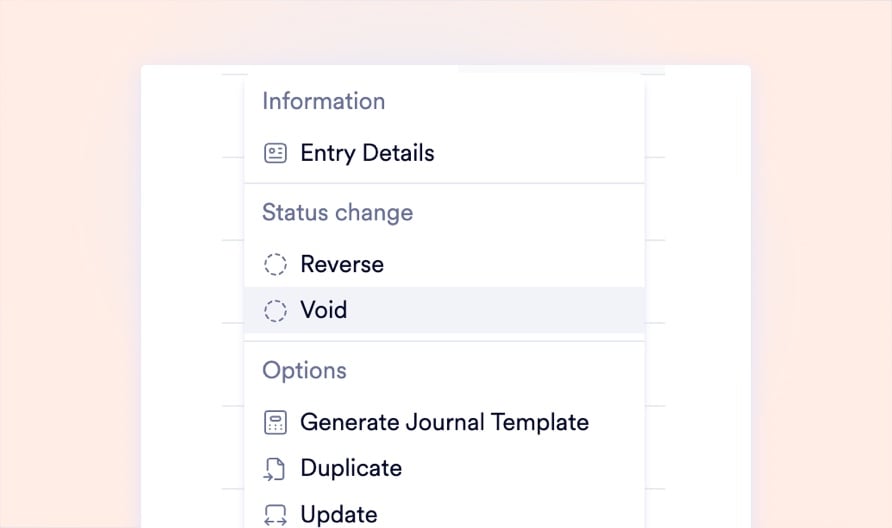
Every journal entry in Naologic carries a direct hyperlink to its originating source document. When auditors ask "Where did this $12,000 entry come from?", you click the link and instantly open the purchase order, goods receipt, or vendor bill that triggered it. No binder tabs, no cross-referencing spreadsheets, no digging through email attachments. Your entire audit trail is one click deep, every single time.
No image

Clickable Source Documents

No image

One-Click Entry Reversals

No image

Administrative Void Records

No image

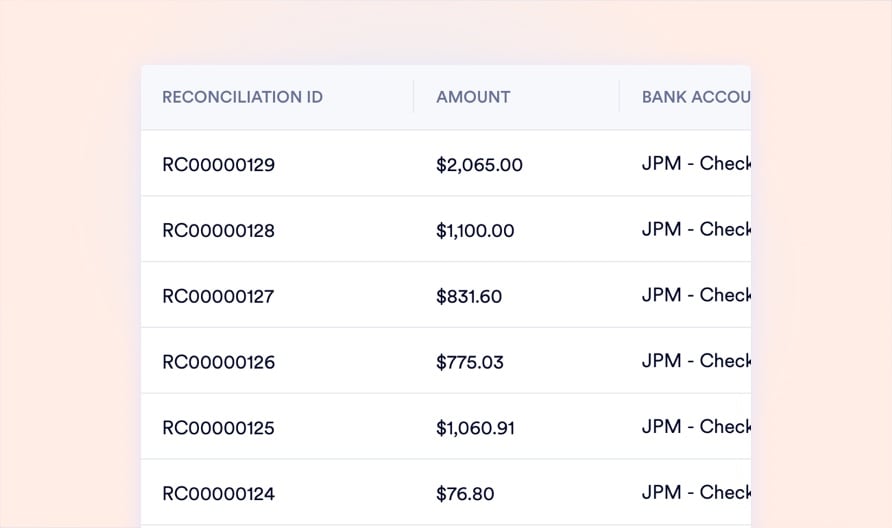
Reconciliation History Log

Chart of Accounts

Infinite Nesting. Zero Clutter. Total Control.

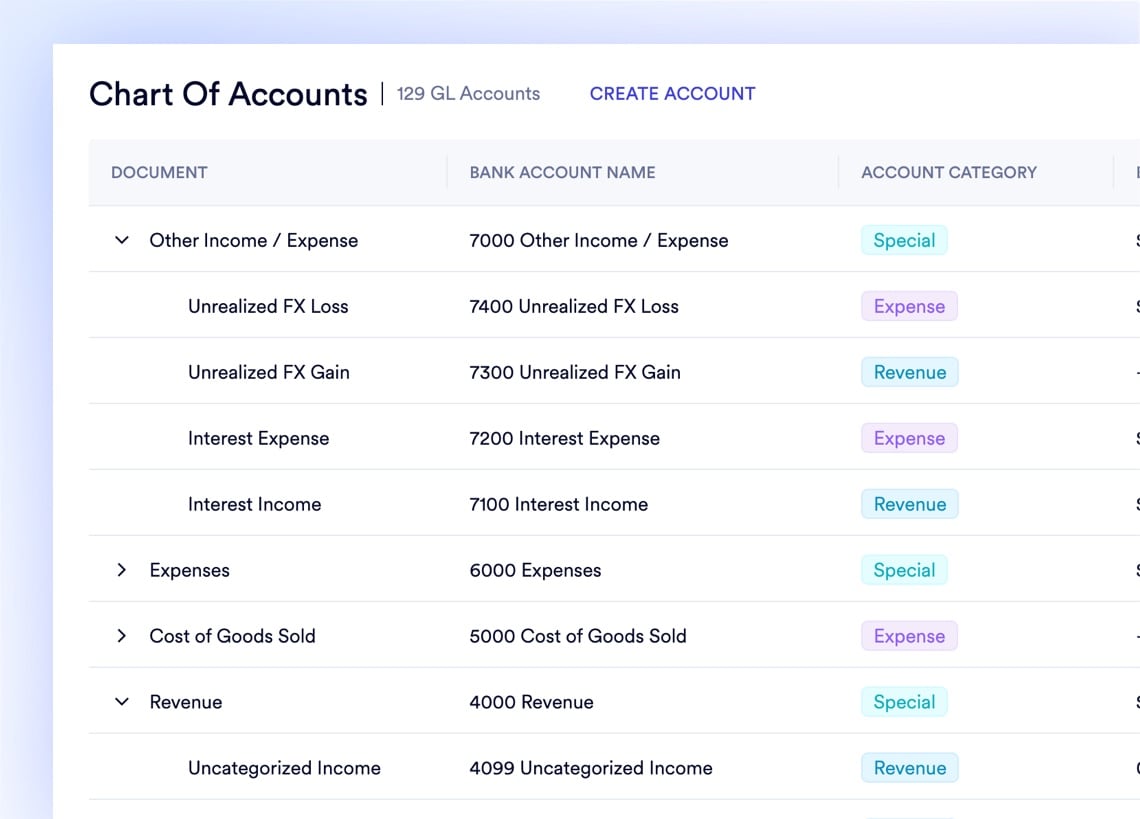
Stop using bizarre numerical codes to group expenses. Build an intuitive, hierarchical Chart of Accounts with unlimited parent-child nesting levels. Expand and collapse categories with a click, so your CFO sees the macro view while your Controller dives into detail. Protect your ledger by designating parent accounts as Header Accounts that physically prevent users from posting broad transactions - forcing them to use the correct sub-account every time. Map new GLs to standardized Account Categories, and your financial statements automatically route the data exactly where it belongs.

Drop image here

Ask Your Financial Data Anything. In Plain English.

You should not need to hire a SQL developer to answer "What were our margins on resin X last quarter?" Type plain-language questions into the AI Report Builder and get instant answers from your entire data lake. Choose from over 100 visualization types - heat maps, waterfall charts, funnel diagrams - and pin live widgets to Private or Public dashboards. Save complex, multi-filter reports as reusable templates and regenerate next month's board deck in a single click.

naologic
Discover Bank
Capital One
Baxter Credit Union
First Commonwealth Bank
Citadel Federal CU
Robins Financial CU
Community Bank
Boeing ECU
Academy Bank
US Bank
Spokane FCU
Regions Bank
KeyBank
Arvest Bank
American Express
Woodforest Bank
PNC Bank
Utah Community CU
Navy Federal CU
TD Bank
Discover Bank
Capital One
Baxter Credit Union
First Commonwealth Bank
Citadel Federal CU
Robins Financial CU
Community Bank
Boeing ECU
Academy Bank
US Bank
Spokane FCU
Regions Bank
KeyBank
Arvest Bank
American Express
Woodforest Bank
PNC Bank
Utah Community CU
Navy Federal CU
TD Bank
First Commonwealth Bank
Citadel Federal CU
Golden 1 Credit Union
Woodforest National Bank
Teachers CU
Huntington Bank
Fifth Third Bank
BECU
Ally Bank
BMO Harris
M&T Bank
USAA
Simmons Bank
First Hawaiian Bank
Eastman CU
Alpine Bank
Empower CU
Synchrony Bank
Discover Bank
First Commonwealth Bank
Citadel Federal CU
Golden 1 Credit Union
Woodforest National Bank
Teachers CU
Huntington Bank
Fifth Third Bank
BECU
Ally Bank
BMO Harris
M&T Bank
USAA
Simmons Bank
First Hawaiian Bank
Eastman CU
Alpine Bank
Empower CU
Synchrony Bank
Discover Bank
VyStar Credit Union
Simmons Bank
T Bank
Bank of Hawaii
Patelco Credit Union
Hills Bank & Trust
Mountain America CU
Fidelity Investments
Old National Bank
First Tech FCU
Capital One
Citibank
Charles Schwab
Vanguard
HomeStreet Bank
Pacific Premier
Lake Michigan CU
Wells Fargo
Chase
Citizens Bank
VyStar Credit Union
Simmons Bank
T Bank
Bank of Hawaii
Patelco Credit Union
Hills Bank & Trust
Mountain America CU
Fidelity Investments
Old National Bank
First Tech FCU
Capital One
Citibank
Charles Schwab
Vanguard
HomeStreet Bank
Pacific Premier
Lake Michigan CU
Wells Fargo
Chase
Citizens Bank
Goldman Sachs
Horizon Bank
State Employees CU
Truist
SoFi
Marcus
E*TRADE
Comerica
Glacier Bank
Columbia Bank
Randolph Brooks FCU
Fairwinds Credit Union
Navy Federal CU
TD Bank
Teachers CU
Huntington Bank
Fifth Third Bank
BECU
Ally Bank
BMO Harris
Goldman Sachs
Horizon Bank
State Employees CU
Truist
SoFi
Marcus
E*TRADE
Comerica
Glacier Bank
Columbia Bank
Randolph Brooks FCU
Fairwinds Credit Union
Navy Federal CU
TD Bank
Teachers CU
Huntington Bank
Fifth Third Bank
BECU
Ally Bank
BMO Harris
ESL Federal Credit Union
Wells Fargo
Huntington Bank
Bank of the West
First United Bank
Boeing ECU
Academy Bank
US Bank
Spokane FCU
Regions Bank
KeyBank
Arvest Bank
American Express
Woodforest Bank
PNC Bank
Utah Community CU
Navy Federal CU
TD Bank
Discover Bank
Capital One
ESL Federal Credit Union
Wells Fargo
Huntington Bank
Bank of the West
First United Bank
Boeing ECU
Academy Bank
US Bank
Spokane FCU
Regions Bank
KeyBank
Arvest Bank
American Express
Woodforest Bank
PNC Bank
Utah Community CU
Navy Federal CU
TD Bank
Discover Bank
Capital One

Your Financial Data Connected to Every Module

Manufacturing Cost Flows Every manufacturing order, work order, and BOM consumption automatically generates the correct journal entries. Your COGS updates in real time as production completes, with full traceability from the factory floor to the financial statement.

See Manufacturing

Inventory Valuation Warehouse transfers, stock adjustments, and material receipts post journal entries automatically. Your Balance Sheet reflects true inventory value at all times, with source document links on every single transaction.

See Inventory

Purchasing and AP Automation Purchase orders flow into vendor bills flow into payment batches. 3-way matching verifies every dollar before it leaves your account. Your AP aging report updates the second a new bill is confirmed.

See Purchasing

Why manufacturers are switching

Naologic vs. Legacy Financial Reporting

QuickBooks gives you static PDFs. SAP forces you into Excel. GlobalShop and JobBOSS trap you in Crystal Reports with zero vendor support. Naologic delivers live, interactive financial statements with drill-down capabilities, saved templates, and AI-powered reconciliation - purpose-built for manufacturing finance teams.


Legacy ERPs
Legacy ERPs
Financial Statements
Interactive drill-down on every line item
One-click period-over-period comparison columns
Toggle between cash and accrual basis
Save and reuse report templates
General Ledger
Source document tracing on every journal entry
Infinite Chart of Accounts nesting
Multi-dimensional journal items (warehouse, department)
Scheduled journal entries with auto-posting
Reconciliation
AI-powered transaction matching
Inline adjustments without leaving the screen
Reconciliation history with unreconcile capability
Reporting & Dashboards
Natural language report builder
100+ visualization types
Private and public dashboards by role
Pre-built system report templates
Asset Management
Automated depreciation schedules
Real-time net book value calculations
Multiple depreciation methods and conventions

Close the Books in Days, Not Weeks

Manufacturing CFOs face a unique challenge: complex cost flows from production, multi-warehouse inventory valuations, and high-volume vendor transactions make the month-end close exponentially harder than service-based businesses. This guide breaks down a practical 5-day closing playbook using Naologic's financial reporting tools.

Controller's Guide5 Sources of AP Cash Leakage in Manufacturing - And How to Close Them

See Interactive Financial Reporting Live Watch your Income Statement, Balance Sheet, and Cash Flow come alive with one-click drill-downs, period comparisons, and saved templates. Book a personalized demo with a manufacturing finance specialist.

Book Your Demo

Explore All Finance and Accounting Features Financial Reporting is one module in Naologic's complete manufacturing ERP. Explore how purchasing, inventory, manufacturing, and QMS all feed clean, automated data into your financial statements.

See All Finance Features