Naologic vs JobBOSS: Calculate your true total cost of ownership

Naologic replaces JobBOSS, QuickBooks, UniPoint, ShopBOSS, and your Crystal Reports consultant in a single AI-native platform. One invoice. One data model. No more whiteboard scheduling.


Your current ERP costs

Current ERP system

License & Support

Annual license / subscription$28K
$0$300K

Maintenance & support (15% of license)

SMB-tier subscription; 3-6 month implementation typical

$4,200
ERP user seats15 seats
3200

IT & Admin Overhead

IT FTEs dedicated to ERP maintenance1 FTE
05
Average IT salary$85K
$30K$150K

Manual Workarounds & Re-entry

Hours/week lost to manual workarounds8h/wk
1h40h
Employees affected20 people
1200
Average affected employee salary$55K
$20K$100K

3-year total savings vs. JobBOSS2

$945K

Includes $25K saved on implementation

3-Year Total Cost of Ownership

JobBOSS2$1.0M
NaologicEST.
$101K

Annual savings

$307K

per year

3-year ROI

934%

return on investment

Payback period

1 mo

to recover switch cost

Hours reclaimed

8,320

per year

Your true annual cost (what you're actually paying)

License + maintenance$32,200
IT overhead$85,000
Manual workaround cost$220,000
Total annual cost$337,200

Naologic (estimated)

15 seats × $169/mo — no maintenance, no SI fees

$30,420/yr

Naologic estimated at $169/seat/month. Actual pricing varies by configuration and contract length.

Logo 1
Logo 2
Logo 3
Logo 4
The JobBOSS Scaling Ceiling

4 Numbers Every JobBOSS Shop Owner Knows Too Well

Growing machine shops hit the same wall in sequence: ShopBOSS for scheduling, UniPoint for quality, a Crystal Reports developer for data, and QuickBooks to keep the books. By the time the stack actually works, the annual tab has tripled and the integrations still break monthly.
$40K+
reported cost escalation when ECI layers ShopBOSS, UniPoint, and custom Crystal Reports development onto a base JobBOSS license
6
disconnected systems in a typical JobBOSS Franken-stack: ERP, QuickBooks, UniPoint QMS, ShopBOSS scheduler, Crystal Reports, and Excel
1000+
native visualization types in Naologic's AI report builder - no developer, no Crystal Reports consultant, no SQL
0
AI capabilities in JobBOSS2: no NLP reporting, no AI agents, no Logic Pilot, no voice, no autonomous execution of any kind

One Platform vs. 5 Disconnected Systems

The typical JobBOSS shop runs 5-plus disconnected tools to approximate what Naologic handles natively. Every sync is a latent failure. Every consultant invoice is a month of operational budget that could be invested in growth.

Naologic
JobBOSS2
JobBOSS2
Naologic
What Naologic Includes Natively

12 Capabilities JobBOSS Charges Extra For or Simply Does Not Have

Scheduling and Manufacturing
Production scheduling
Reflow scheduling to maximize work center utilization
Production reporting
Interactive timeline
Finance and Accounting
Plaid for automated bank linking
Intelligent transaction matching with AI
Source document tracing for every entry for full audit trails
Scheduled journal entries
Reporting and AI
Natural language report builder
Over 1000 visualization types
Manufacturing expert
Visual report mode
Quality and Compliance
Raw material inspections
Nonconformance reporting
Certificate of conformance
Quality control points

Naologic vs. JobBOSS2

Everything ECI Charges Extra For - Included by Default

JobBOSS2 handles quoting and job tracking. Scheduling, quality, accounting, and reporting each require a separate purchase. Every column below shows exactly where the gap sits - and what it costs your shop every month it stays open.


Naologic
Naologic
JobBOSS2
JobBOSS2
Business Impact
Scheduling and Shop Floor
Production scheduling
Partial
No add-on required in Naologic - ShopBOSS license required for basic scheduling in JobBOSS
Rush order re-scheduling
One-click Reflow algorithm vs. manually re-sorting 200 jobs in Excel
Reflow scheduling to maximize work center utilization
Machine capacity recovered automatically vs. lost idle time by default
Interactive timeline for 1,000+ concurrent MOs
Enterprise-scale performance vs. freezing and crashing at high job volumes
Work center partial changeovers
Multi-pallet and multi-job machines managed natively vs. manual workarounds
Finance and Accounting
Native enterprise general ledger
QuickBooks dependency eliminated on day one vs. permanent sync maintenance
Plaid for automated bank linking
Live bank feed vs. manual statement uploads or fragile third-party connectors
Intelligent transaction matching with AI
Hundreds of lines cleared in minutes vs. manual one-by-one matching
Source document tracing for every entry for full audit trails
Audit question answered in 5 seconds vs. hours of paper file digging
Scheduled journal entries
Monthly accruals automated vs. manually re-typed by an accountant every month
Parent accounts with multiple levels of nesting
Partial
Infinite nesting vs. rigid flat chart structure with limited grouping options
Reporting and AI
Natural language report builder
Zero developer cost vs. paying a Crystal Reports consultant to change a column
Over 1000 visualization types
Any visualization on demand vs. basic bar chart exports only
Manufacturing expert AI
Instant cost-breakdown analysis vs. no AI of any kind in JobBOSS2
Custom AI reports delivered by text and email
Leadership receives KPIs automatically vs. manually logging in to hunt for data
Natural language voice interaction
Conversation-based ERP access vs. keyboard-only interface
Quality and Compliance
Raw material inspections
Built in at zero added cost vs. paid UniPoint add-on with separate sync
Nonconformance reporting
Quality data unified with production data vs. siloed in a third-party QMS
Certificate of conformance
One click from inspection record vs. manually drafted in a separate system
Quality control points
Production-gate inspections native vs. paid UniPoint add-on required
Finished goods inspections
Release control built in vs. separate third-party license at additional cost
Platform Architecture
BOM complexity at 600+ components
No ceiling vs. documented scalability wall at complex assembly sizes
Part number character length
Unlimited vs. hard 30-character structural constraint baked into JobBOSS data model
Cloud-native auto-save
No data loss risk vs. JobBOSS requiring manual save to retain any entry
AI across all modules
AI-native architecture vs. zero AI of any kind in the entire JobBOSS2 platform

Why Growing Shops Outgrow JobBOSS

4 Hard Limits That Choke a Scaling Machine Shop

Scheduler That Requires ShopBOSS to Function

JobBOSS's native scheduling is too generic for multi-job machines or parallel operations - shops fall back to Excel exports and whiteboards within months. When a rush order drops in, someone manually re-sorts 200 open jobs by hand.

Monthly QuickBooks Sync Failures

Without a native enterprise ledger, shops glue JobBOSS to QuickBooks via integrations that break on a monthly cycle. Every failure means manual double-entry and job costs that are always 48 hours stale.

Crystal Reports

Standard reports are near-unusable out of the box, and changing a dispatch list column means paying an external developer. Business users cannot self-serve even the most basic operational query without a consultant invoice.

Quality Locked Behind UniPoint Invoices

Raw material inspections, finished goods sign-off, and certificates of conformance are all paid UniPoint add-ons, not native features. Every growth milestone triggers another third-party license with no guarantee the sync holds.

The Whiteboard Stays Blank. The QuickBooks Connector Stays Off. Once a machine shop migrates to Naologic, the whiteboard stays blank and the QuickBooks connector stays off.
Add image in properties

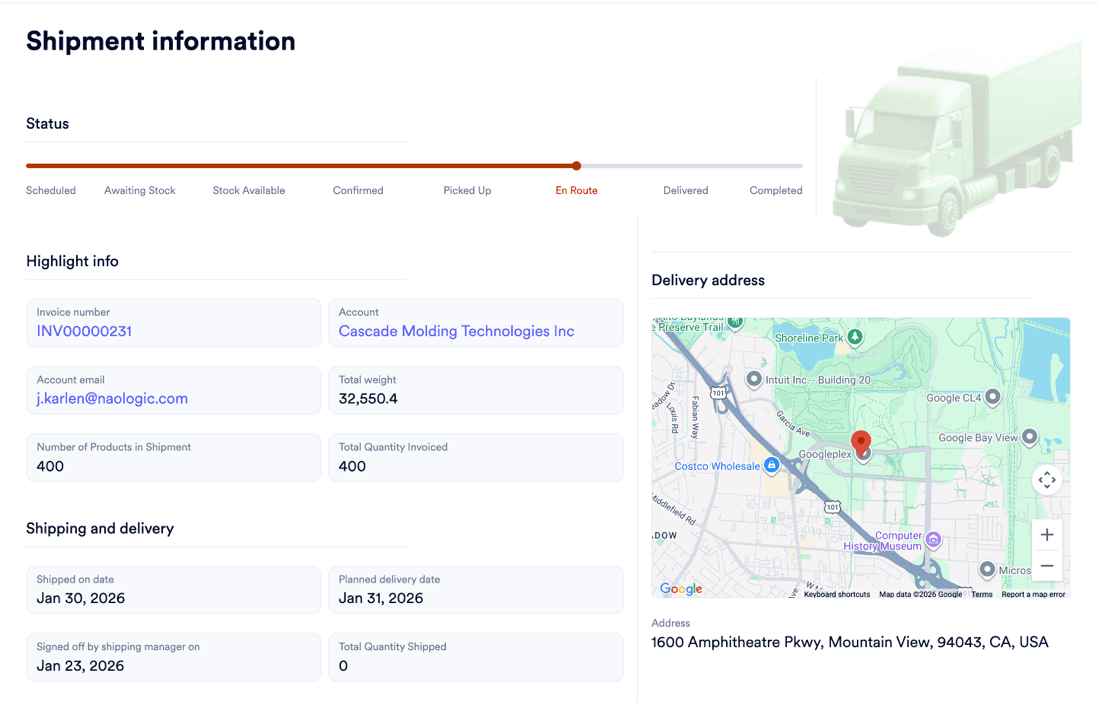
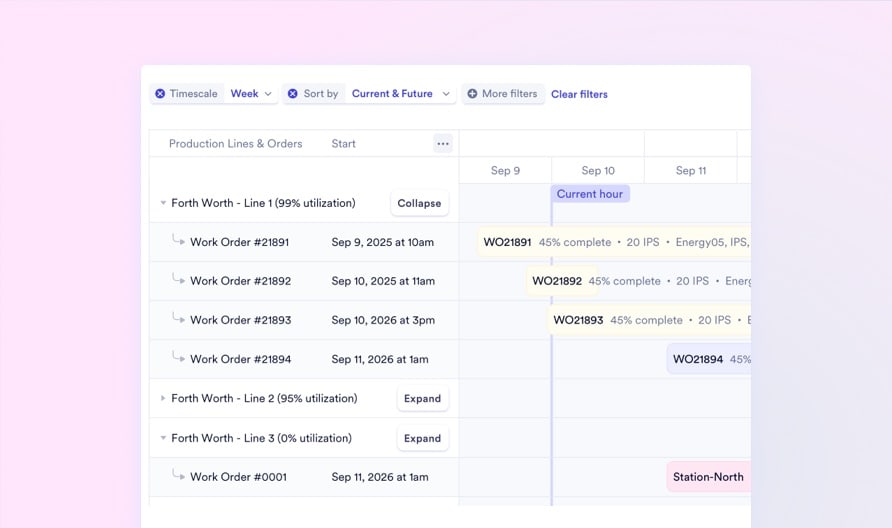
Native Scheduling That Needs No Add-On Drag, drop, and reflow your entire factory floor from one Gantt timeline - no ShopBOSS license, no whiteboard, no Excel export on rush days. One-click Reflow eliminates idle machine time automatically when a job finishes early.

Explore scheduling
Add image in properties

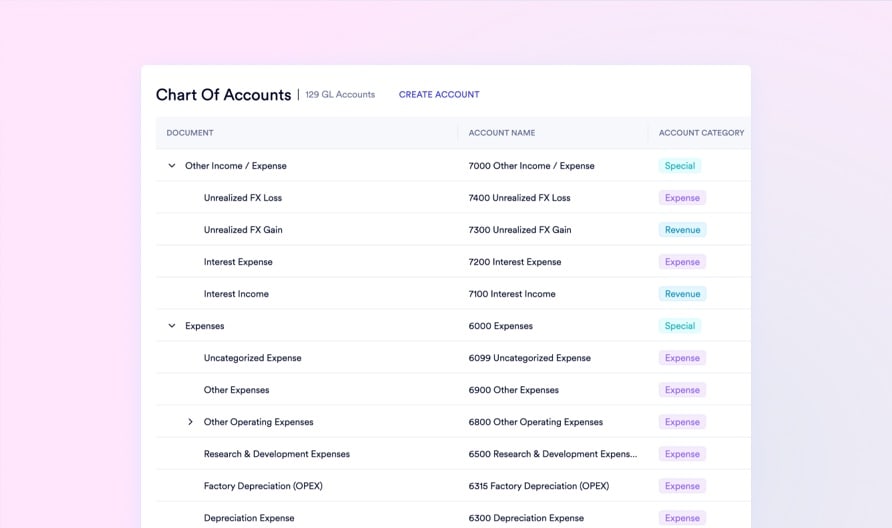
One Ledger. No QuickBooks. No Sync Failures. Naologic's native enterprise general ledger includes Plaid bank linking, AI-powered transaction matching, and source document tracing on every journal entry. The accounting stack comes built-in - the QuickBooks connector never needs to be configured.

Explore finance
Add image in properties

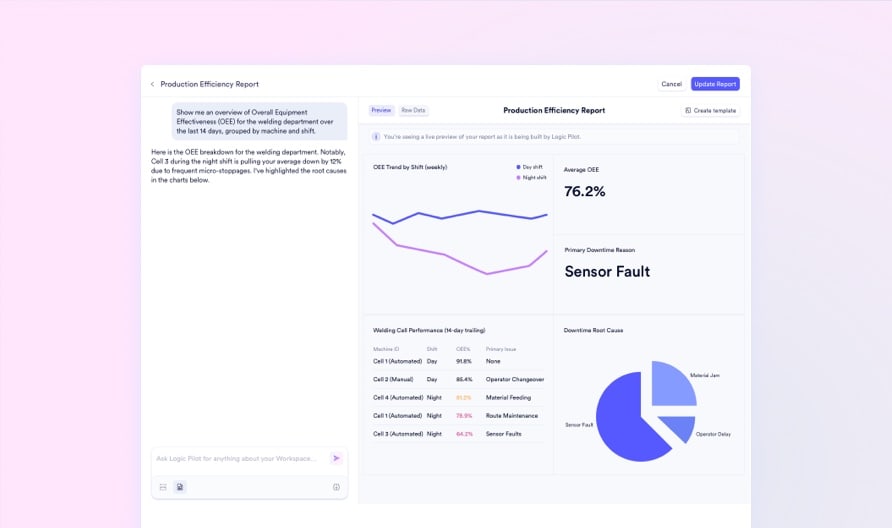
Ask Your ERP Anything. In Plain English. Replace Crystal Reports with a Natural language report builder that queries your entire data lake via conversational text. Over 100 visualization types, zero developer cost. Executives receive weekly AI-synthesized KPI summaries via email automatically.

Explore AI reporting

Migration Path

From JobBOSS to Naologic: 4 Steps, No Data Loss, No Whiteboard Reinstated

Naologic's AI migration tooling is purpose-built to import from legacy job shop ERPs. Historical jobs, part numbers, BOMs, customer records, and vendor data migrate intact. Your 30-character part number constraint disappears on day one. Most mid-market shops are live within 2-6 weeks.

1

Map Your Existing JobBOSS Data

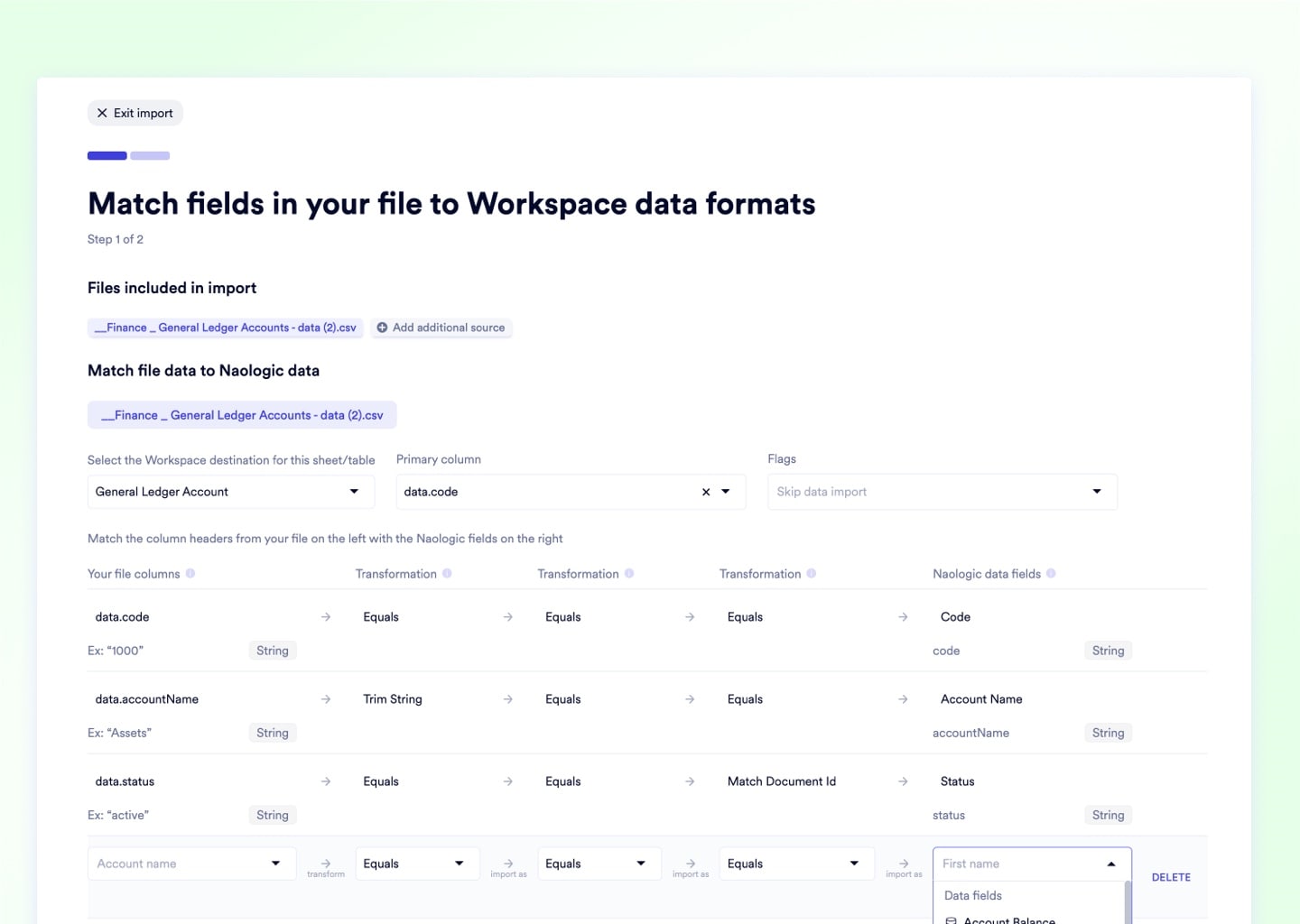
Naologic's AI migration tool ingests your JobBOSS export and maps every part number, BOM, customer record, and historical job to the Naologic data model. Your 30-character part number limit disappears on import and historical job costing carries over intact.

2

Validate Before You Cut Over

Run both systems in parallel for your chosen overlap window. Naologic's validation engine flags every data discrepancy before you decommission JobBOSS, ensuring zero silent data loss or missing job history.

3

Configure to Your Shop's Exact Workflow

Finance, scheduling, QMS, and procurement go live configured to your exact operation - not a generic demo template. Native AI assistants accelerate team onboarding so most users are self-sufficient within days, not weeks.

4

Go Live and Close the ERP Sprawl

Decommission JobBOSS, QuickBooks, UniPoint, ShopBOSS, and Crystal Reports on a single cutover date. One subscription invoice replaces five. The whiteboard stays blank.

Upload media for "Map Your Existing JobBOSS Data"

Built for the future of manufacturing, not the past

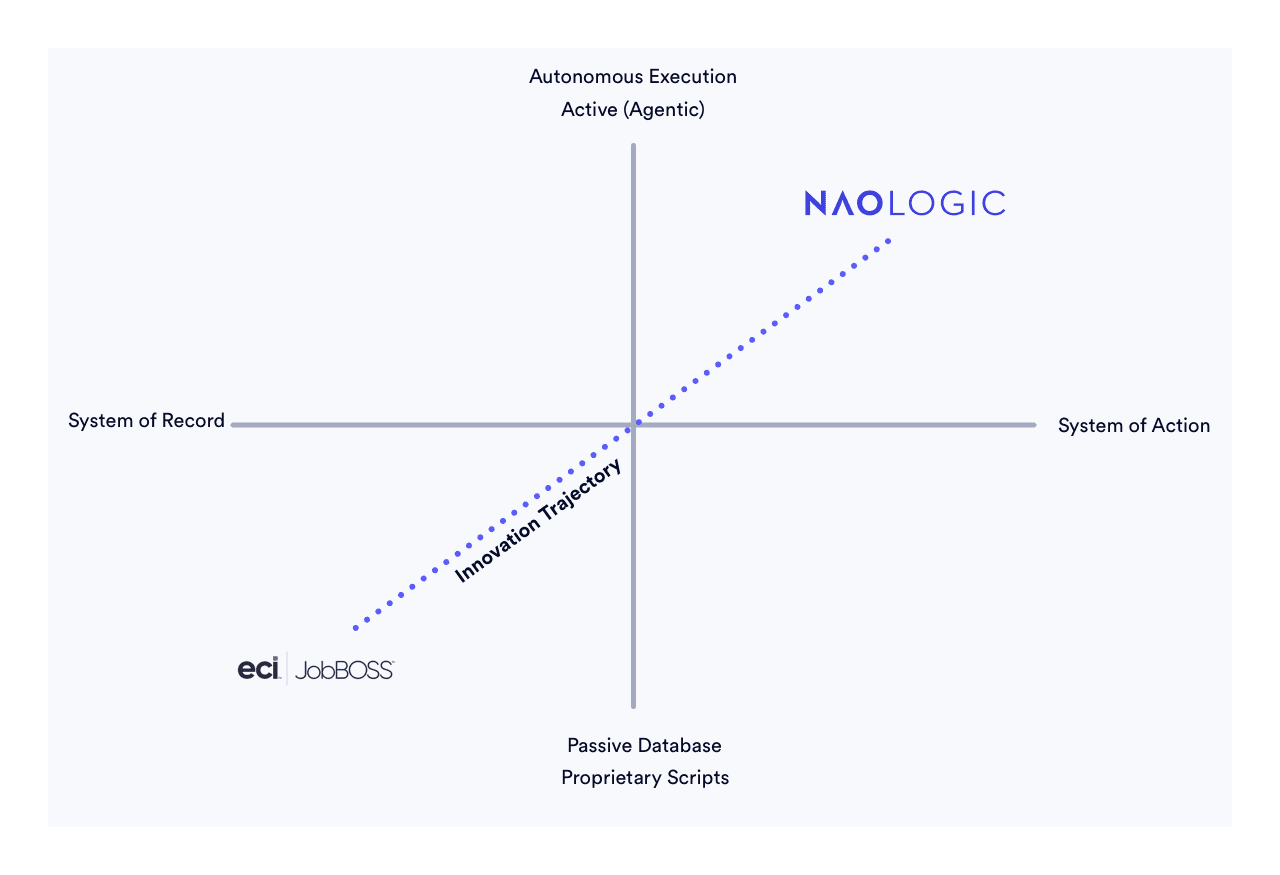
JobBOSS was built for an era of fragmented add-on modules, click-heavy workflows, and frustrating Crystal Reports. Naologic is the polar opposite. We replace "nickel-and-dime" legacy tech with an all-inclusive no-code platform, upgrading passive databases to autonomous AI agents that dynamically schedule your floor and protect your margins.

Schedule a demo
Visual

FAQ for current JobBOSS users

Questions we hear from frustrated JobBOSS users before switching

Does Naologic require a ShopBOSS equivalent add-on for real scheduling?

No. Production scheduling is native to Naologic's manufacturing module - the interactive Gantt timeline, Reflow optimizer, and work center filters ship at no additional cost with no add-on required.

Explore Scheduling

Can Naologic handle rush orders without collapsing the whole schedule?

Yes. Drag the priority order to the top of the Gantt and trigger the Reflow algorithm - the system automatically compresses all subsequent jobs forward, reclaiming dead machine time without manual re-sorting.

See Reflow

We run multi-pallet machines. Does JobBOSS's scheduling limitation follow us to Naologic?

No. Naologic supports work center partial changeovers natively, handling concurrent jobs on single machines and multi-pallet operations without the scheduling conflicts JobBOSS users have to manually manage.

Ready to upgrade your operations?

Every day on JobBOSS is another manual re-schedule, another QuickBooks sync failure, and another Crystal Reports invoice for data your team should pull in 10 seconds. Book a demo and see what a fully unified, AI-native manufacturing platform actually feels like to run.

One platform. One invoice. Five tools retired.

Naologic consolidates JobBOSS, QuickBooks, UniPoint, ShopBOSS, and Crystal Reports into one monthly subscription. No more module invoices, no more integration maintenance budget line.

See Pricing

Migration takes 2-6 weeks, not 18 months.

Naologic's AI migration tooling imports your historical jobs, BOMs, and part records directly from your JobBOSS export. Most mid-market shops go live in 2 to 6 weeks with no data loss and no external implementation partner required.

How Migration Works